
Every day, millions of users subscribe to the stores on the Shopify App Store. Shopify stores play a vital role in helping B2B business owners to meet specific challenges and business requirements. Also, as per recent reports, Shopify has about 10% of the share in the global eCommerce tech market. It is because of its quick and easy adaptability and features.
Still, planning a successful Shopify app development is a challenge for many B2B businesses. So, this Shopify app development guide is designed to give you a clear and practical view of how to build a Shopify app, understanding its types and challenges, along with monetizing strategies.
What is Shopify?
In simple terms, Shopify is an eCommerce platform that helps people or businesses thrive in the digital era. It is a free app development tool launched in 2006. The Shopify API platform helps creators and developers build and set up online stores to list products, accept payments, customize websites, and track statistics in real time with minimum stress. Before jumping into the development process, our comprehensive Shopify app development guide will walk you through the benefits, types, and cost factors.
Advantages of Shopify App Development
Building a custom app inside the Shopify ecosystem isn’t just about adding new features. It includes the things that ready-made apps don’t quite cover. For businesses focused on long-term growth, control, and stability, custom Shopify app development often proves more practical and beneficial than relying on stacked plugins.
Purpose-Built for How You Operate
No two stores follow the same playbook. A custom app lets your pricing rules, inventory flow, and fulfillment cycles work the way your business already does without forcing awkward workarounds.
Direct, Reliable API Connections
Shopify’s APIs handle products, orders, customers, and more. A well-planned app connects straight to these systems, keeping data accurate, synced, and up-to-date across tools.
Improved Performance Over Plugin Overload
Too many apps slow stores down. Replacing several plugins with one focused solution reduces load, improves speed, and creates a smoother experience for shoppers.
Built to Grow With You
Custom apps are designed with expansion in mind, making it easier to scale traffic, catalogs, and regions without rebuilding later.
Stand-Out Store Experiences
When others use the same tools, differentiation fades. A tailored app lets you offer features competitors can’t copy.
Smarter Costs Over Time
Higher upfront effort often means fewer subscriptions, less conflict, and lower long-term maintenance.

Types of Shopify Apps By Business Use Cases
Shopify offers these types of apps:
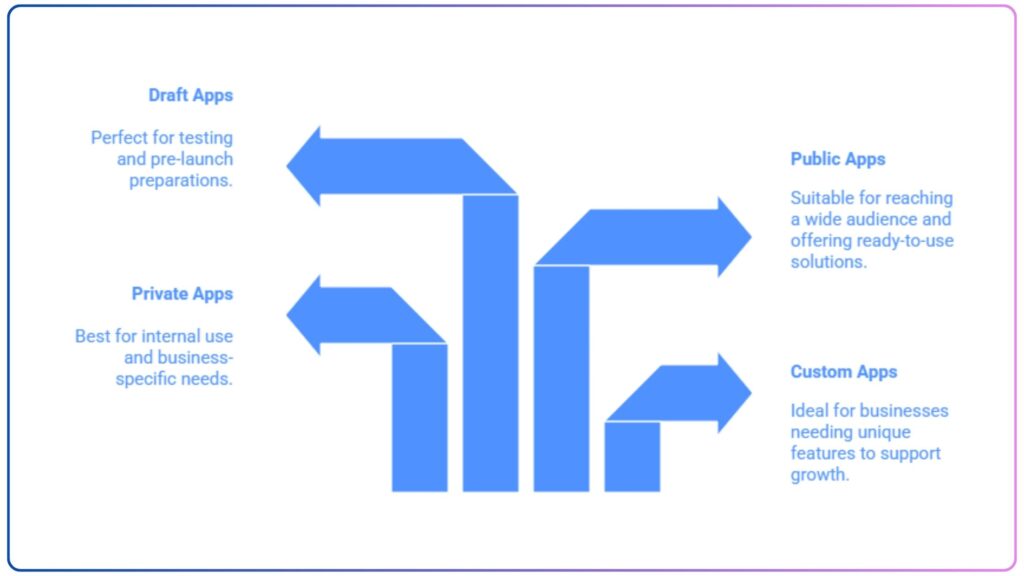
Custom Apps
Businesses can get tailored applications with Shopify app development. It is an excellent approach to expand your business. Along with this, you can add more features and functionalities to your existing store.
Private Apps
These apps are often developed for businesses with specific needs that cannot be fulfilled with custom apps. Also, private apps are not listed in the app stores.
Public Apps
As the name suggests, these apps can be used by a variety of retailers. They can download and use it. However, a few public apps are not listed on the Shopify App Store but are still available for use. These can be downloaded from the developer’s website.
Draft Apps
Draft apps are a part of the Shopify app development process. They are used for testing purposes. These can only be downloaded from developers’ stores.
Essential Features of a Shopify App
Successful Shopify app development is not defined by how many features and functionalities it includes. Rather, how well those features work in real-world store operations. Below are the core capabilities that every high-performing Shopify app should deliver.
User-Friendly Interface
Merchants usually work fast and under pressure. A simple, clutter-free interface helps them set things up, monitor activity, and manage tasks without stopping to “figure things out.” Easy navigation, clear wording, and fewer steps make the app easier to adopt and to stick with.
Smooth API Integrations
A reliable Shopify app connects cleanly with Shopify APIs and essential third-party tools. When orders, inventory, and customer data sync properly, merchants avoid manual fixes, data mismatches, and day-to-day operational slowdowns.
Customization Options
Every store runs differently. Apps that allow merchants to tweak rules, pricing logic, or workflows without developer help feel far more practical and scalable as the business grows.
Real-Time Analytics
Merchants don’t want raw data. Rather, they want clarity. Real-time insights into performance, usage, and revenue impact help them act quickly, without digging through complex dashboards.
Multi-Currency and Language Support
For global sellers, local relevance matters. Hence, your Shopify store should support multiple currencies and languages to ensure the shopping experience feels natural across regions.
Automated Workflows
Automation removes repetitive and manual work. From order handling to notifications, smart workflows save time and reduce errors.
Secure Payment Integrations
Strong security builds trust. Your app must follow platform standards and protect sensitive transaction data at every step.
24/7 Support
Problems can arise anytime. Consistent support and monitoring keep stores running smoothly, even when issues appear unexpectedly.
Tech Stack for Shopify App Development
A robust tech stack helps ensure performance, scalability, and security. Therefore, before jumping into the development process, businesses need to know and understand the tools used.
Front-End
- React.js, Next.js
- Vue.js
- HTML, CSS, JavaScript
Back-End
- Node.js
- Ruby on Rails
- Python
Database
- MongoDB
- PostgreSQL
Shopify API & SDKs
- Rest API, Shopify GraphQL API
- Shopify App Bridge
Hosting & Deployment
- AWS, Google Cloud
- heroku
Security & Compliance
- SSL encryption
- GDPR & PCI compliance
Step-by-Step Process To Develop a Shopify App
Currently, there are 2,859,828 live stores running on the Shopify platform. So, you need a well-planned Shopify app development strategy to stand out from the crowd.
Research & Brainstorming
The first step in creating a Shopify store is to understand its purpose, what problem it is going to solve, who your target audience is, and what resources are needed. With these insights, you can decide on features and functionalities. Also, after a detailed analysis, you can build a comprehensive persona that includes pain points and current gaps.
Set Up Shopify Partner Account and Development Store
You can access development tools, testing environments, and the app submission portal by setting up a Shopify partner account. This way, you can create as many stores as required to test your app.
Furthermore, Shopify app development tools help you replicate the actual merchant environment. This helps to stimulate workflows, test integrations, and discover issues before deployment. Configure your account with sample products, customer data, and order histories to mirror the target merchant’s operations.
Choosing the Right Tech Stack
Selecting the right technology stack for your Shopify app development is crucial, as it can impact your store’s scalability, performance, and maintenance. Shopify provides support for multiple technologies and various combinations of development approaches.
Implement Authentication and API Integrations
Authentication boosts your app’s security. Use OAuth 2.0 with HMAC validation to securely handle app installations and prevent unauthorized access from outside Shopify.
For embedded apps, rely on session token authentication (not cookies) and validate tokens on every request. Always store access tokens securely on the backend and never expose them in client-side code or logs.
Leverage Shopify’s Admin API for store management and the Storefront API for customer-facing features, with solid error handling for token expiry, rate limits, and outages. Finally, ensure compliance with PCI DSS and GDPR to maintain strong data protection for eCommerce stores.
Core Features Development
Use Shopify Polaris to design the interface. Shopify Polaris includes pre-built React components that align with Shopify design patterns. Start building features that directly solve business problems.
Testing & Quality Assurance
Testing helps ensure your app meets the merchant’s expectations and works as expected under real-world conditions. You can test your app with Shopify plans to verify compatibility across different subscription tiers. Also, partner with Beta merchants to test your app in a real environment before the final launch. Test it for performance and bugs, and apply revisions provided by review teams.
App Store Submission
Once you are sure that your app meets all technical specifications, guidelines provided by Shopify, security standards, and user expectations. Add your app to the listing by giving a clear name, concise description, features, and images or screenshots that showcase your app’s value proposition. Give detailed setup instructions and demo videos so merchants can easily use your Shopify store. Create product documentation with privacy policies and terms and conditions.
Launch and Iterate
Next, execute your launch strategy to drive initial installations. Use email marketing, social media, and the Shopify partner network to reach your target merchants. Encourage early adoption and reviews by offering launch incentives.
It is also necessary to continuously improve your app based on merchants’ feedback and market trends. Release timely updates with bug fixes, improved performance, and better features. Provide release notes and in-app notifications to let merchants know about updates.

Cost To Build a Shopify App
Shopify app development cost falls somewhere between $7,000 and $30,000. However, cost can go beyond $50,000 depending on complexities and advanced features. The final budget varies depending on your requirements. A simple app with basic features will cost you less as compared to a more advanced Shopify store.
Top Challenges in Building a Shopify App
Strict Platform Guidelines
Shopify has strict rules and policies that must be followed during the Shopify app development process. And these guidelines are updated frequently, which makes it necessary to stay compliant so your app doesn’t get rejected by the Shopify App Store.
API Rate Limits
Shopify enforces limits on API requests, which restrict how your app can communicate with the platform. Therefore, API calls must be efficiently optimized to ensure smooth performance without exceeding limits.
Security & Data Privacy
Handling sensitive merchants’ data requires strong security measures in place. Shopify app development services must implement encryption and authentication while sticking to data protection rules like GDPR and PCI to avoid data breaches.
Performance Optimization
Your Shopify app store must be fast and responsive to handle large data volumes. A poorly optimized app can slow down a merchant store, which also influences user experiences.
Third-Party Integrations
Most of the Shopify apps need third-party APIs and service integrations like payment gateways, CRMs, etc. This helps ensure seamless communication between APIs without glitches.
Revenue Strategies for Your Shopify App
To enhance the revenue of your Shopify store, focus on a mix of monetization strategies like:
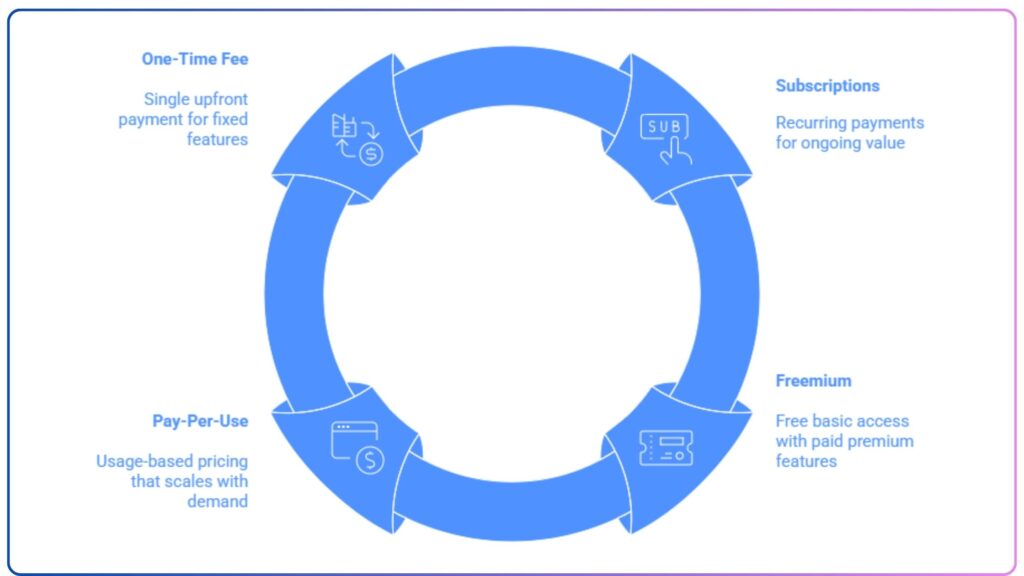
Subscriptions
Businesses can charge a recurring fee for continuous use of the app. It is a consistent revenue stream and is a good option for apps that provide significant ongoing value.
Freemium
Offer a basic version of your Shopify store to attract a large user base, and then offer premium features and advanced functionalities for a fixed fee.
Pay-Per-Model
This approach aligns well with app utilization, where you can implement charges based on usage metrics.
One-Time Fee
This model goes well with the apps with fixed functionalities that don’t require frequent updates, so you can charge an upfront fee for full app usage.
How Can CodingWorkX Help in Shopify App Development?
We at CodingWorks specialize in building Shopify apps that improve store performance and user experience. Our team provides custom Shopify app development services, smooth API integrations, and solutions that scale with your brand. As a trusted mobile app development company, we help you at each stage—market research, UI/UX design, feature-rich development, QA, launch, monitoring, and long-term support.
Additionally, we utilize advanced tools and strategies to help you build powerful and revenue-generating Shopify stores. So, connect with us now, and let us create future-ready Shopify apps that assist you in getting a competitive edge.
FAQs
How to choose the best Shopify app development company?
Do comprehensive research and read reviews. CodingWorkX is a tech-forward mobile app development company. We hold the expertise to build immersive and robust Shopify stores. Along with this, our team is well-versed in all Shopify integrations.
How long does it take to create a Shopify application?
The actual timeline for the custom Shopify app development depends on the project’s scope and complexity. However, it will probably take from a few weeks to months. But the final time is influenced by features, functionalities, etc. You can connect with our experts for more details.
Can you help migrate my store to Shopify?
Yes. Being a top Shopify app development company, we can migrate your existing store to Shopify smoothly. Our team handles product catalogs, customer data, orders, integrations, and SEO considerations. We keep your store secure, optimized, and compliant for performance on the Shopify platform while ensuring zero data loss during transition.
How much does it cost to build a Shopify app?
There is no fixed answer for this. The Shopify app development cost changes from project to project, depending on complexities and functionalities. The platform and app features also play a major role in the final budget. For more detailed estimates, connect with our Shopify experts.
Is Shopify app development beneficial?
Shopify is an excellent platform for businesses looking to grow easily and quickly. This platform offers all the required tools that most retail businesses need. Also, you can earn from subscriptions, commissions, or one-time purchases.